
Record and edit
Film it, cut it and caption it on your phone.
Record with a prompter, get a first cut with captions, and fix it by dropping lines, all in the iPhone app.
What it does
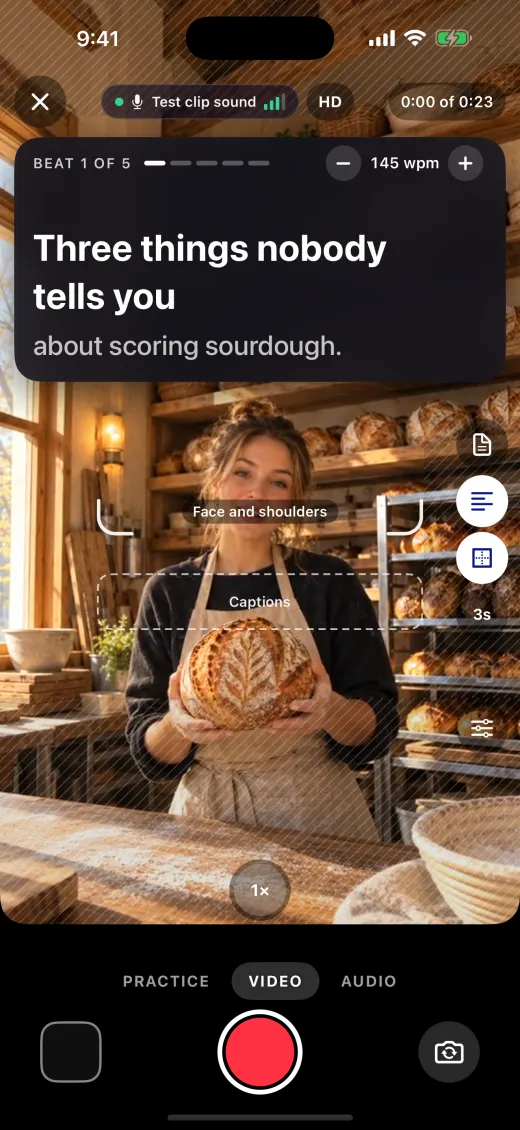
A prompter at your pace
Record with a prompter that scrolls your script at your pace, and keep every take.
Takes file themselves
One tap files a take in the planned video it matches, in B-roll, or in a new topic named from your first words. A take that clearly matches files itself, and a take with no talking offers B-roll first.
Edit clips from Photos
Pick up to 30 videos and photos, and they open in the editor in the order you picked them.
Edit by lines
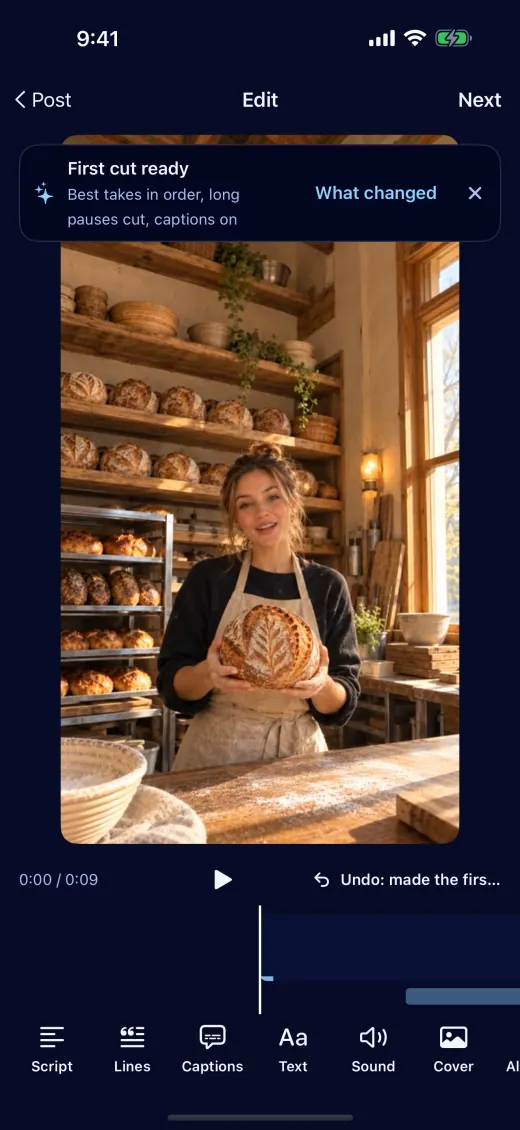
Lines lists what you said. Tap one to drop it and the cut moves into the pause beside it, so no word gets clipped.
Checks before you post
Before you post, checks catch a cut inside a word, a shot under two seconds, text over a face and sound that peaks too loud. Add to post applies the fixes, and the cover row puts the sharpest frames first.
Claude edits it too
Claude edits the same video by line number from any chat, and your phone renders the result.
A first cut, done for you
The first cut puts your best takes in order, cuts long pauses and turns captions on. What changed lists each step, with Undo.
Cutaways, fades and voiceover
Add a clip at the playhead, before a line or at the end, or lay a take over the video as a cutaway while your voice keeps going. Fade between clips, let the sound start early or run on, and record a voiceover.
Where viewers left
After it posts, Claude lines the retention curve up with your cuts and names the line where viewers left.
How record and edit compare
We found no prompter and no editing by spoken lines on the other five schedulers’ pages.
| What it does | Chockstone Labs | Buffer | Hootsuite | Later | Metricool | Publer |
|---|---|---|---|---|---|---|
| Record with a prompter | Yes: iPhone app | Not found | Not found | Not found | Not found | Not found |
| Cut out the middle of a clip | Yes: By dropping a line | Not found | Partly: Trim and cut not stated | Partly: Crop and trim only | Yes: Free plan | Yes: Split, plan not stated |
| Captions on the video | Yes: On in the first cut | Not found | Yes: Plan not stated | Not found | Not found | Not found |
| Edit by what you said | Yes: Lines, with no clipped words | Not found | Not found | Not found | Not found | Not found |
Checked November 1, 2026 on each company’s own pages. A plan name means that plan or a higher one.
- Has it
- Paid plans only
- A narrower version
- Their page says no
- Not found on their pages
| Tool | Cheapest monthly price |
|---|---|
| Chockstone Labs | Free Starter |
| Metricool | Free |
| Buffer | Not found on their pages |
| Hootsuite | Plan not stated |
| Later | Crop and trim only, free |
| Publer | Plan not stated |
Sources
We make Chockstone Labs, so we are not neutral. These rows are the ones this page is about, so each tool’s strengths elsewhere don’t show here: our full comparisons say where each tool is ahead. Prices and plans change often, so check their sites before you decide. If something here is wrong, email hello@chockstonelabs.com and we will fix it.
Start free, with no card.
Free for 1 brand, $19 a month for 5, $79 a month for 25. Creator and Studio also add client approval links, shared reports and your own link page design. Questions? Email hello@chockstonelabs.com.