
Approvals
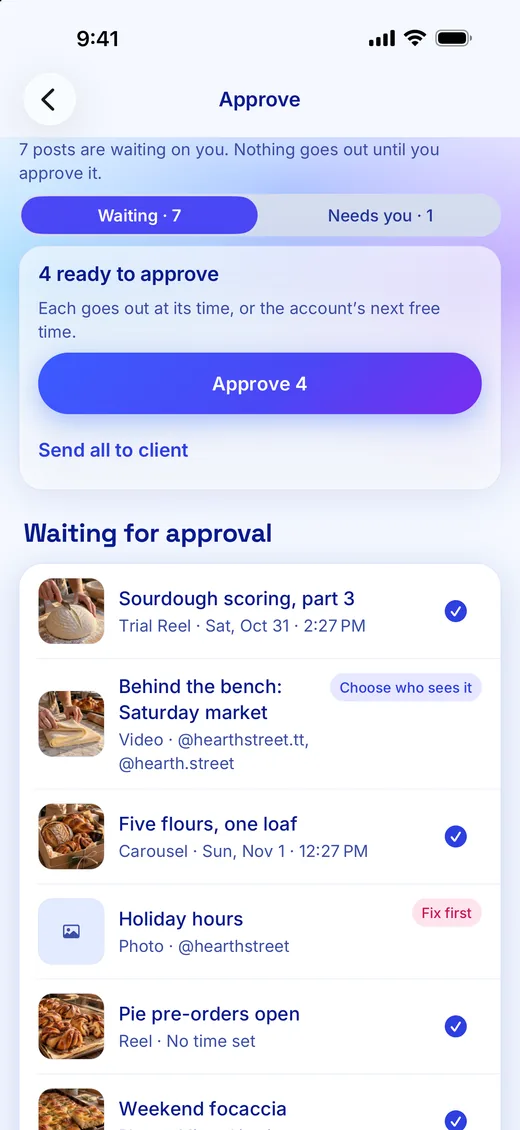
Nothing goes out until a person says yes.
Every post waits for a yes from your team or your client, and our server holds that rule for every person, tool and AI assistant.
What it does
Approve on the web or on iPhone
Nothing goes out until a person on your team approves it. Approve from the calendar on the web, or swipe right in the iPhone app.
Clients approve through a link
Clients and sponsors approve through a link, with no account and no seat to buy. A sponsor can watch the video in the page and decide.
Rules held on our server
Approvals, posting limits and messaging rules are enforced on our server, so no assistant or tool can skip them.
Undo for 7 days
Every change is listed in Activity, and most can be undone for 7 days. Anything already published stays published.
Self-approval, only if you allow it
An owner can let one connection approve what it submits. That is off until they turn it on, and TikTok and YouTube posts still wait for a person.
How approvals compare
Every Chockstone Labs plan has approvals. On Creator and Studio a client approves through a link, with no seat to buy.
| What it does | Chockstone Labs | Buffer | Hootsuite | Later | Metricool | Publer |
|---|---|---|---|---|---|---|
| An approval step before posts go out | Yes: Every plan | Paid plans only: Team | Paid plans only: Advanced | Paid plans only: Growth | Paid plans only: Advanced | Paid plans only: Business |
| Clients approve through a link, with no account | Paid plans only: Creator and Studio, no seat | No: Clients need a login | Not found: Team members approve | Partly: Link can comment, not approve | Paid plans only: Advanced, by emailed link | No: Clients sign in as members |
| Approve in the phone app | Yes: Swipe right on iPhone | Paid plans only: Team | Yes: Plan not stated | No: Approvals are desktop only | Partly: Send for review; approving not stated | Paid plans only: Business |
| A log of every change | Yes: Every plan | Not found | Partly: Inbox conversations only | Partly: Per post, Growth | Partly: Per post, paid plans | Not found |
| Undo a change days later | Yes: For 7 days | Not found | Not found | Not found | Not found | Not found |
Checked November 1, 2026 on each company’s own pages. A plan name means that plan or a higher one.
- Has it
- Paid plans only
- A narrower version
- Their page says no
- Not found on their pages
| Tool | Cheapest monthly price |
|---|---|
| Chockstone Labs | Free Starter |
| Publer | $30 Business, $5 or $10 an account |
| Buffer | $36 Team, $6 or $12 a channel |
| Later | $50 Growth |
| Metricool | $67 Advanced, at 15 brands |
| Hootsuite | Advanced, up to $399 a user; no starting price published |
Sources
- Buffer: every team feature
- Buffer: approving drafts in the mobile app
- Hootsuite: approvals
- Hootsuite: approving posts
- Hootsuite: external approvals
- Hootsuite: mobile app
- Hootsuite: plans
- Later: team collaboration and approvals
- Metricool: approvals
- Metricool: mobile app
- Metricool: posts library
- Publer: approval access levels
- Publer: approving posts
- Publer: member roles
We make Chockstone Labs, so we are not neutral. These rows are the ones this page is about, so each tool’s strengths elsewhere don’t show here: our full comparisons say where each tool is ahead. Prices and plans change often, so check their sites before you decide. If something here is wrong, email hello@chockstonelabs.com and we will fix it.
Start free, with no card.
Free for 1 brand, $19 a month for 5, $79 a month for 25. Creator and Studio also add client approval links, shared reports and your own link page design. Questions? Email hello@chockstonelabs.com.